









CalExotics Connect™ Kegel Excerciser
Dear Customer,
Congratulations on the purchase of your adult pleasure product! This customer information guide provides useful advice and tips on how to use and care for your product. Please keep this information for your reference.
CalExotics Connect™ Kegel Excerciser
SE-0001-10-3
Description:
- Silicone
- 9 functions of vibration
- Memory chip resumes on last function used
- USB rechargeable
- Waterproof
- Security travel lock – hold for 3 seconds to turn on or off
- Complete charge in 2 hours
- Runs on highest speed for 40 minutes, and on lowest speed for 60 minutes
- One year warranty
General Product Information
Instructions for Use:
- Clean the product with warm water and soap, or toy cleaner before and after use.
- If the product is used anally, clean thoroughly before using vaginally.
- Use caution when cleaning vibrating or motorized products. Moisture in the battery compartment can cause malfunction.
- Apply a sufficient amount of lubricant to the surface of the product before use. Avoid applying lubricant to the controller of vibrating or motorized products, as this can cause malfunction.
- Only use a water-based lubricant unless otherwise specified. Oil-based lubricants may damage certain materials.
- Thoroughly read and follow any instructions listed on/in the packaging of the product before use.
- For pump and/or suction products, be sure to familiarize yourself with the air release feature on your product before use.
- Do not use force with your product.
- Keep the product in a clean, cool and dry place. Do not expose to direct sunlight.
- Keep the product separated from other products made with different materials to avoid any chemical reactions.
- Be sure product is fully inserted before activating.
- Be sure product is turned off before removing.
- Allow vibrating or motorized products to cool down after use and before storing.
Instructions for Batteries:
- Refer to the package regarding information on what batteries are needed for operation, and how many are included.
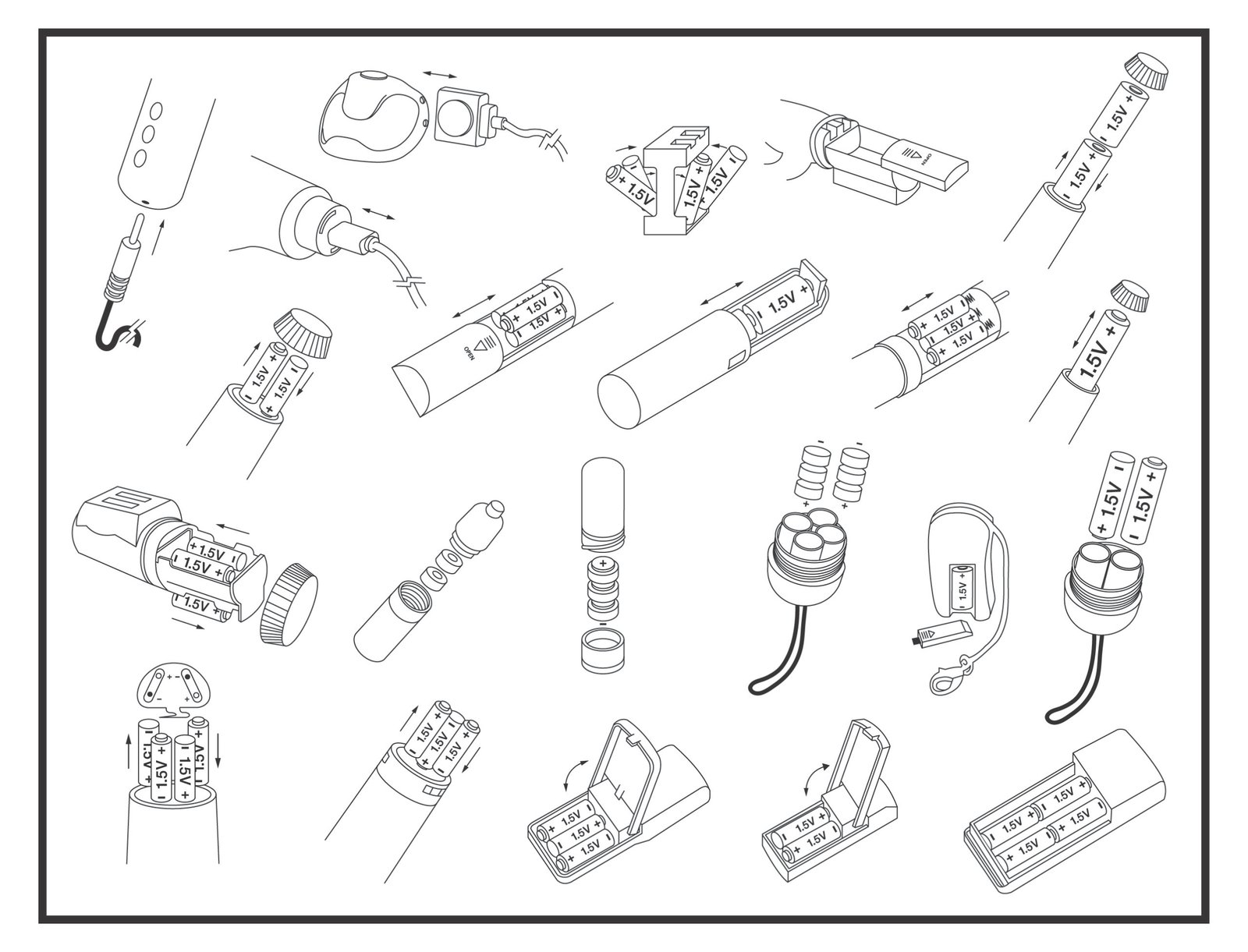
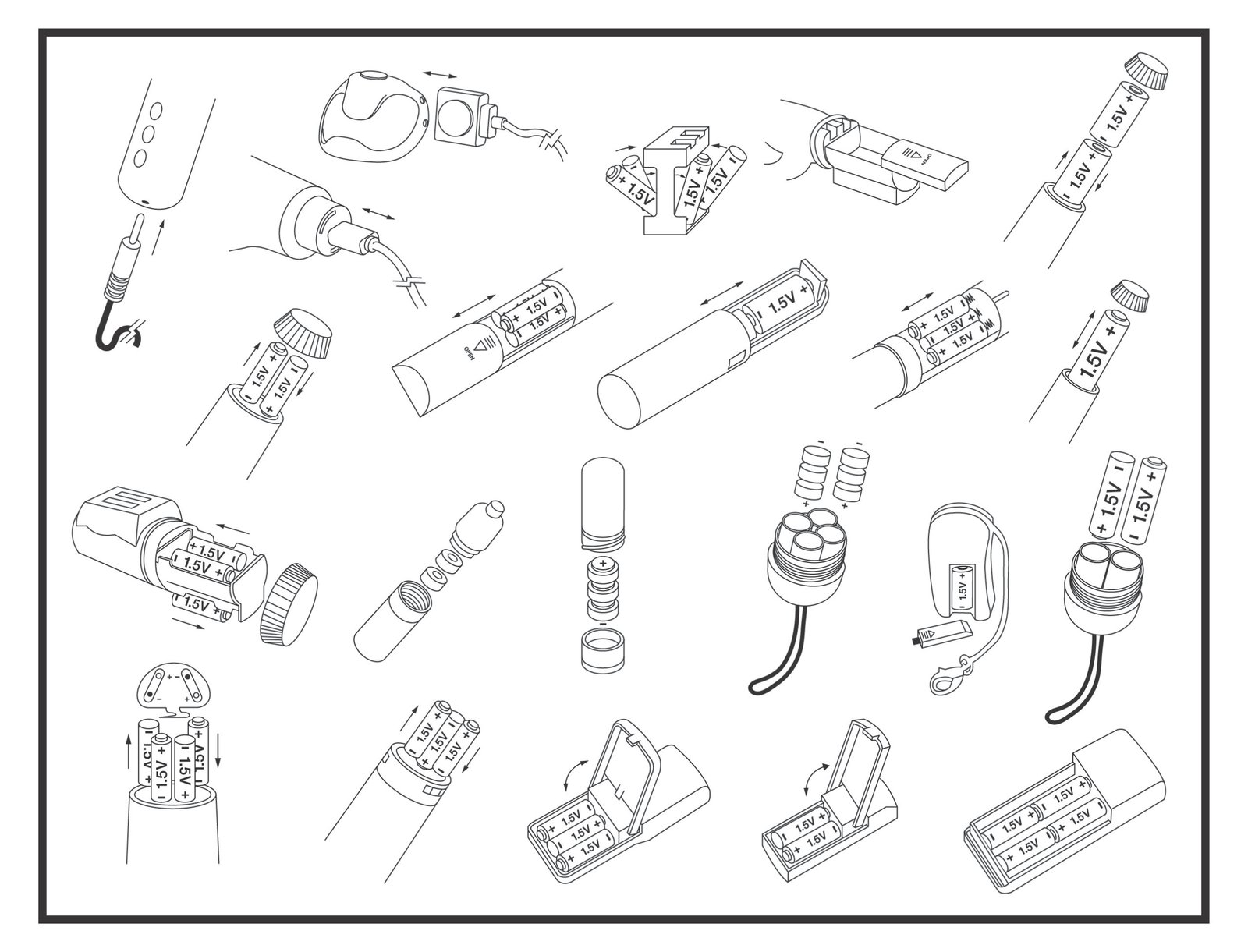
- Find your product type among the drawings and follow the diagram to insert the battery(s) (Fig. 1).
- Make sure the battery contacts are clean and unobstructed.
- Make sure that the batteries are inserted correctly and securely.
- Insert batteries according to the correct +/- polarity markings. Improperly inserted batteries may cause malfunction.
- Do not short out the contacts (i.e. do not bridge the contact points with metallic objects).
- Use only new or newly charged batteries. Do not combine old and new batteries.
- Remove the batteries from the device after each use to prolong the life of the batteries and avoid corrosion.
- Do not charge non-rechargeable batteries.
Instructions for Rechargeable Products:
- Find your product type among the drawings and follow the diagram to plug in charger cord (Fig. 1).
- Make sure to use the charging cord provided with your product. Using any other charger may cause malfunction.
- Do not force charging cord into product.
- Make sure to charge product using a USB wall charger. Charging your product using a computer or laptop will result in longer charging times, and/or malfunction.
- Do not charge your product in or around water.
Warnings and General Advice:
- Keep out of reach of children.
- Do not use product in areas where the skin is irritated, broken, and/or infected.
- Do not share products with others.
- Carefully read the description of materials on the package to avoid allergic reactions (e.g. latex).
- If you experience irritation or pain during use, stop use immediately.
- Do not heat/cool the product except where expressly recommended to do so.
- Do not excessively or forcefully bend or stretch the product.
- The product is not intended for commercial use or for any therapeutic purpose.
- This product is intended for use as non-medical pleasure device only.
- For external use only. Any product use for medical purpose or for a use that has an adverse effect on any function of the body is prohibited.
- Do not get non-waterproof products wet, as this may cause malfunction.
- For waterproof products, make sure the battery compartment is securely closed prior to use.
- Should the product overheat, turn it off immediately and let it cool before renewed use.
- Do not throw products and/or batteries into a fire.
- The supplier is not liable for the improper use of the product.
- Read all instructions carefully before use.
Environmental Safety:
Please recycle your product packaging material. Products no longer used should be taken to your local household hazardous waste disposal facility in accordance with your national/local recycling regulations and the directives 2002/96/EC and 2006/66/EC. Any product with a crossed out waste bin symbol (  ) indicates this product must be disposed of at a local hazardous waste collection point or an authorized recycling facility.
Battery Disposal:
Please dispose of used batteries in accordance with your national/local recycling regulations. You can take your used batteries to your local hazardous waste collection point, or anywhere batteries are sold. Batteries containing hazardous substances are labeled with the sign  and one of the chemical symbols Cd (battery contains cadmium), Hg (battery contains mercury) or Pb (battery contains lead). Lithium batteries may only be returned in a discharged state to your local hazardous waste collection point or authorized recycling facility. To protect against short circuits, fully discharge product before disposal.
For Penile Restrictive Devices:
THIS IS AN ADULT PLEASURE TOY AND IS NOT INTENDED FOR ANY MEDICAL OR THERAPEUTIC USE.
Use (if non-vibrating): This product is designed for a man to wear at the base of his penis for pleasurable sensations and to improve sexual performance.
Use (if vibrating): This product is designed for a man to wear at the base of his penis with the vibrating motor facing up towards his navel, while his partner rubs against the vibrator for pleasurable sensations during intercourse and to improve sexual performance.
Warnings: (1) Product is not intended for contraceptive/birth control or treatment for erectile dysfunction. (2) Male should not wear the product any longer than 30 minutes at a time. Allow 60 minutes between additional uses. (3) Do not fall asleep under the influence of drugs or alcohol while wearing this product. (4) Prolonged use (without removal) may result in bruising at the base or permanent injury to the penis. (5) Do not use if you have decreased sensation of pain in the area of the penis. (6) Use may aggravate already existing medical conditions such as Peyronie’s disease (the formation of hardened tissue in the penis that causes pain, curvature and distortion, usually during erection), priapism (persistent, usually painful erection of the penis as a consequence of disease and not related to sexual arousal), and urethral strictures (narrowing of the urethra, sometimes making it difficult to urinate). Consult your physician should any complication occur and discontinue use immediately.
(Fig. 1)

App Download:
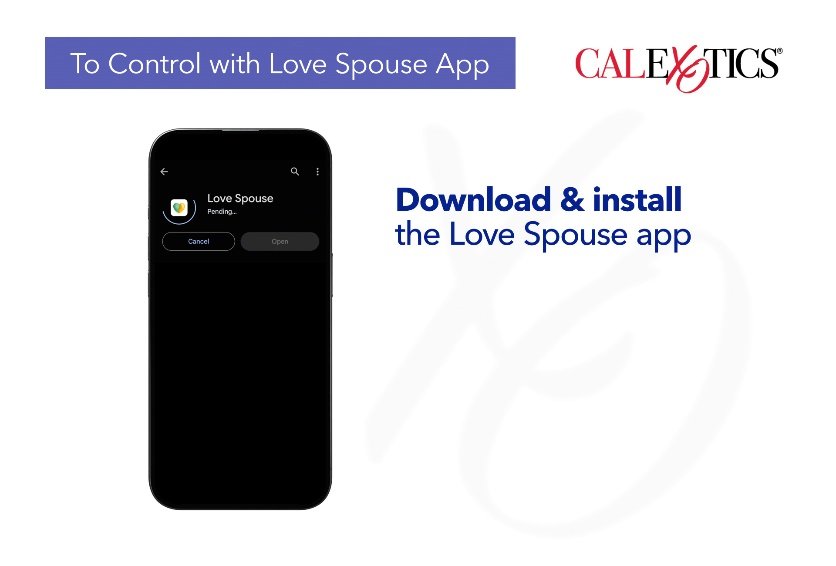
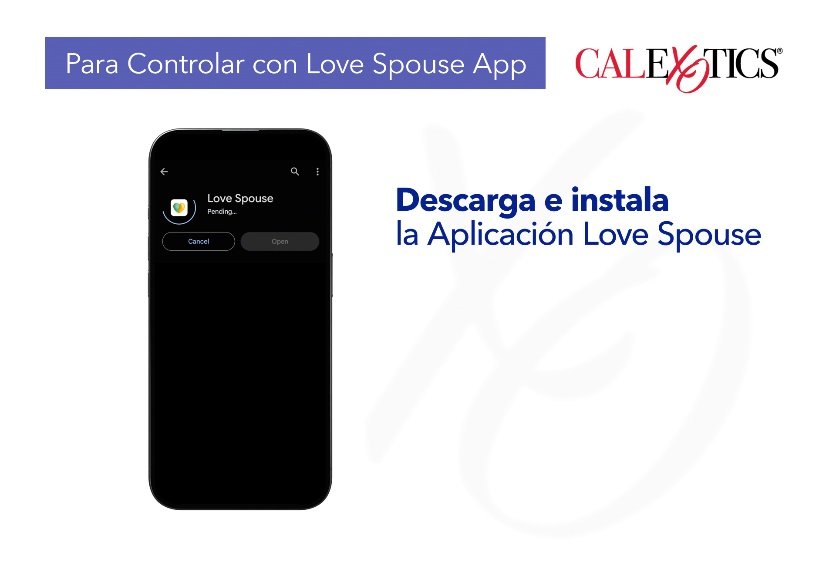
Search for Love Spouse in the App Store or Google Play. Download and install.
Register and Log In:
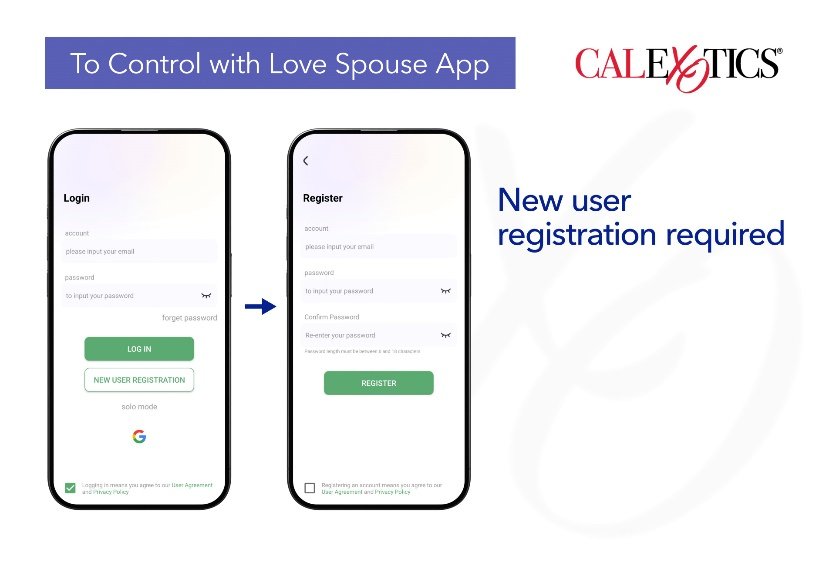
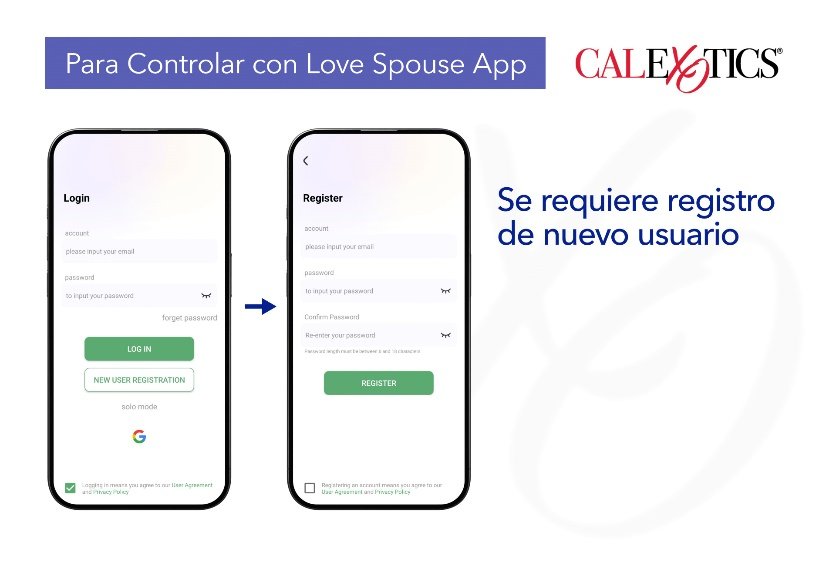
Tap the Love Spouse icon to enter the App. A new user registration is required on your first login.
Tap New User Registration and complete the registration with your email address. Accept the user agreement and privacy policy located at the bottom of the screen.
After registration, enter the account and password to log into the App.
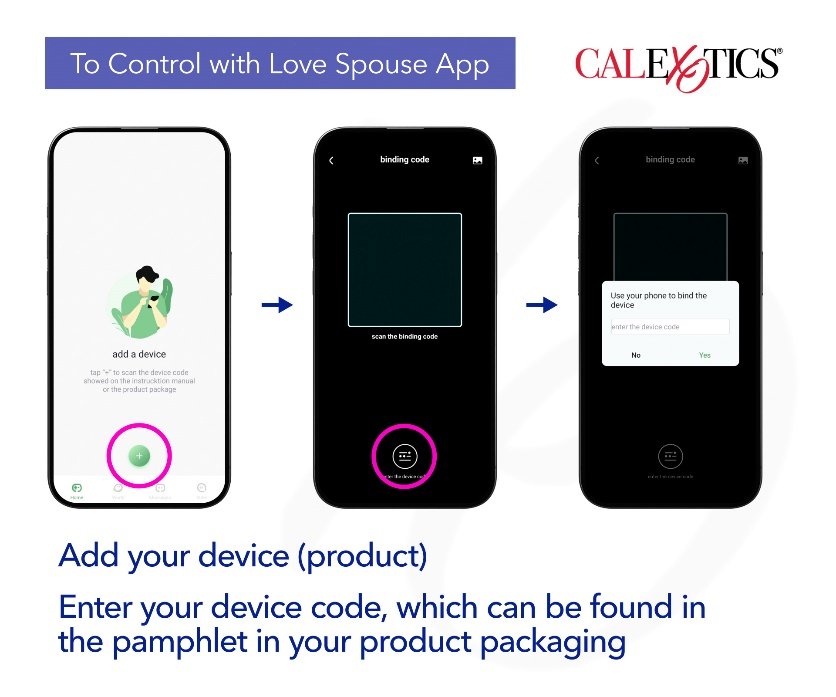
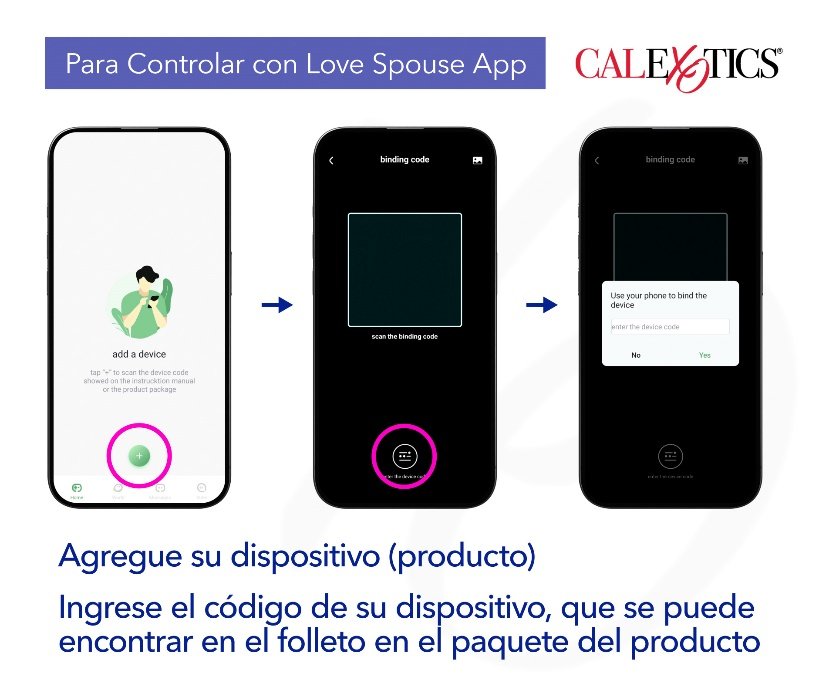
You will need to bind the device after logging in for the first time.
With the phone connected to the internet and your Bluetooth turned on, open the App and tap the “+” button. Tap the Enter Device Code and type in your device code. The device code can be found in the pamphlet in your product packaging. Tap Routine/Regular Control to start using the device.
Long press the device icon to delete the device and modify the device name.
Note: The Bluetooth of the mobile device must be turned on to control the device. If the Bluetooth is not turned on at this time, a prompt will appear. You must turn the Bluetooth on before you can control the device.
Controlling Your Device (product):
Press and hold the power button on the device for 3 seconds to activate; an LED light will indicate the device is activated. Repeat this step to deactivate the device.
Using the Love Spouse App, choose from the different modes on the top left menu:
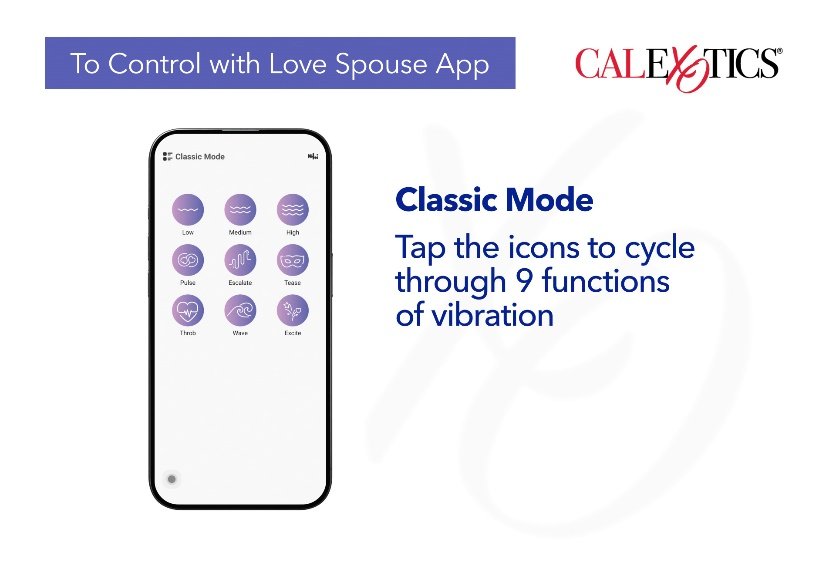
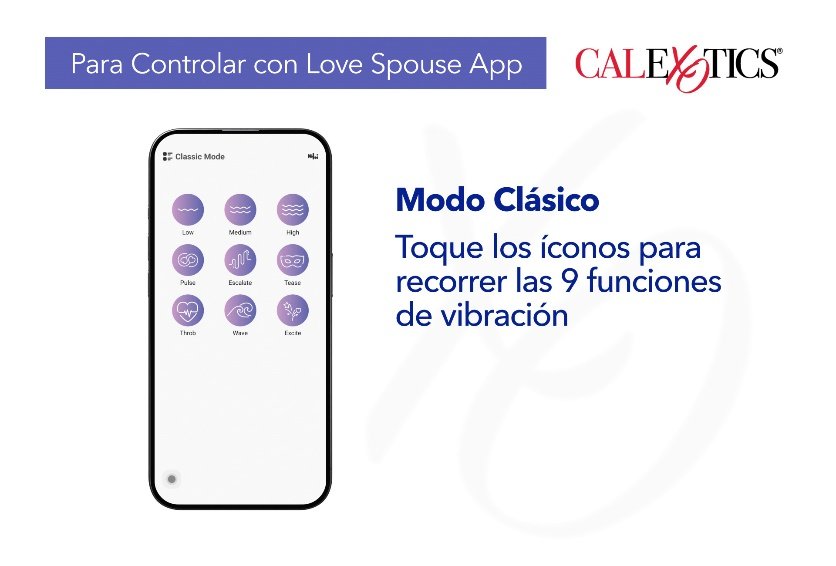
Classic mode: Tap any icon to choose between the 9 functions of vibration. The device will vibrate to the corresponding mode. At the same time, the icon on the App will flash. Tap this icon again to stop the vibration mode and enter the standby state. The App icon will also stop flashing.
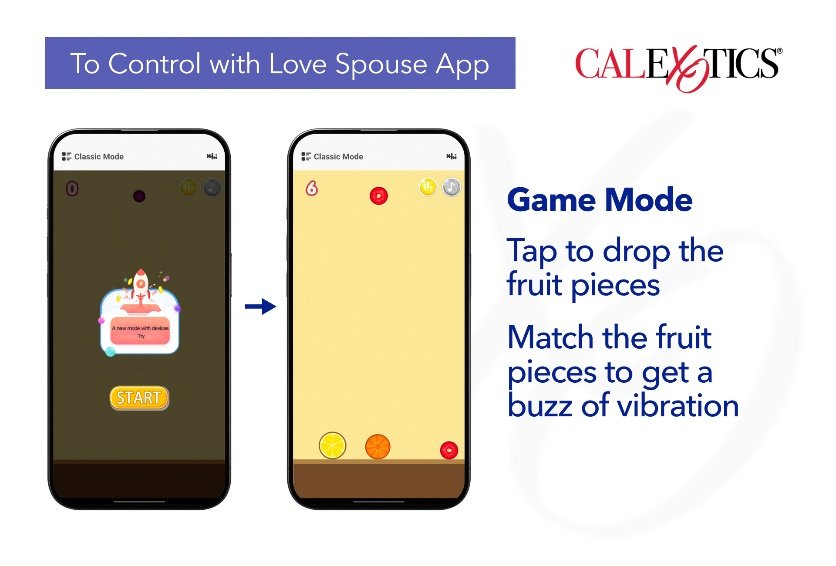
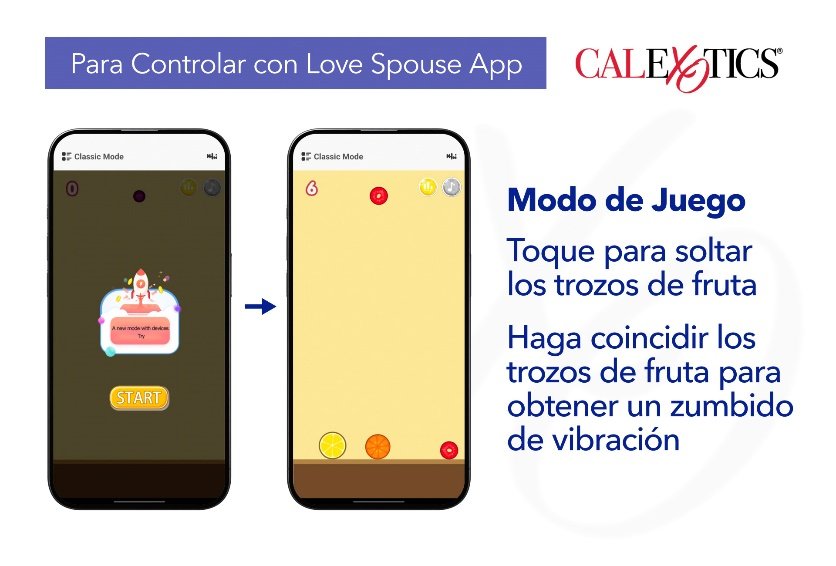
Game mode: Tap Game Mode to enter Game Mode. Tap start to begin the game. Tap any area on your mobile device to drop the fruit pieces. Match the fruit pieces to achieve vibration. The larger the fruit pieces, the higher the vibration intensity.
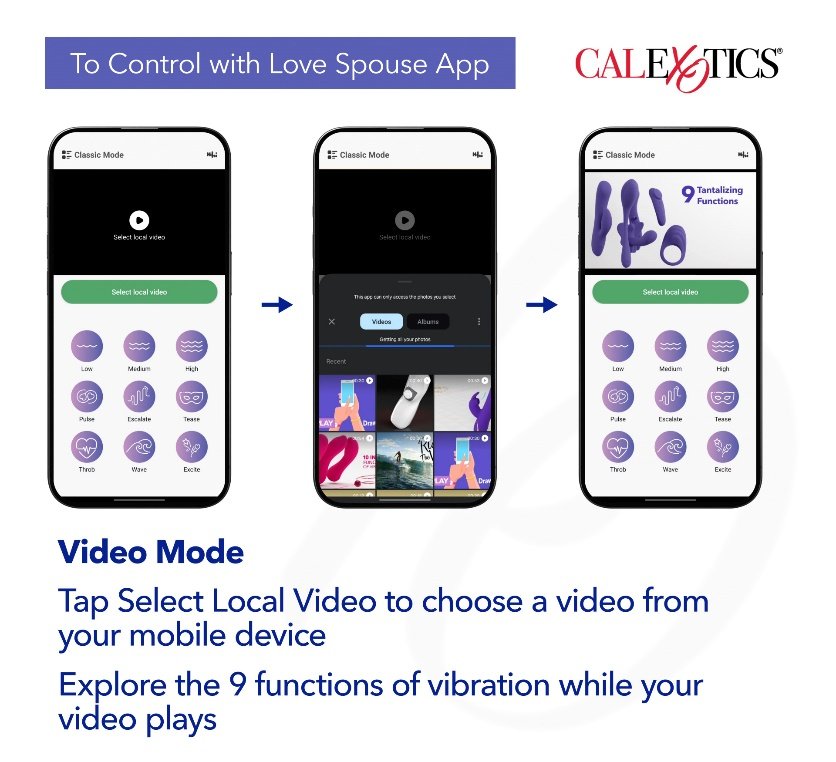
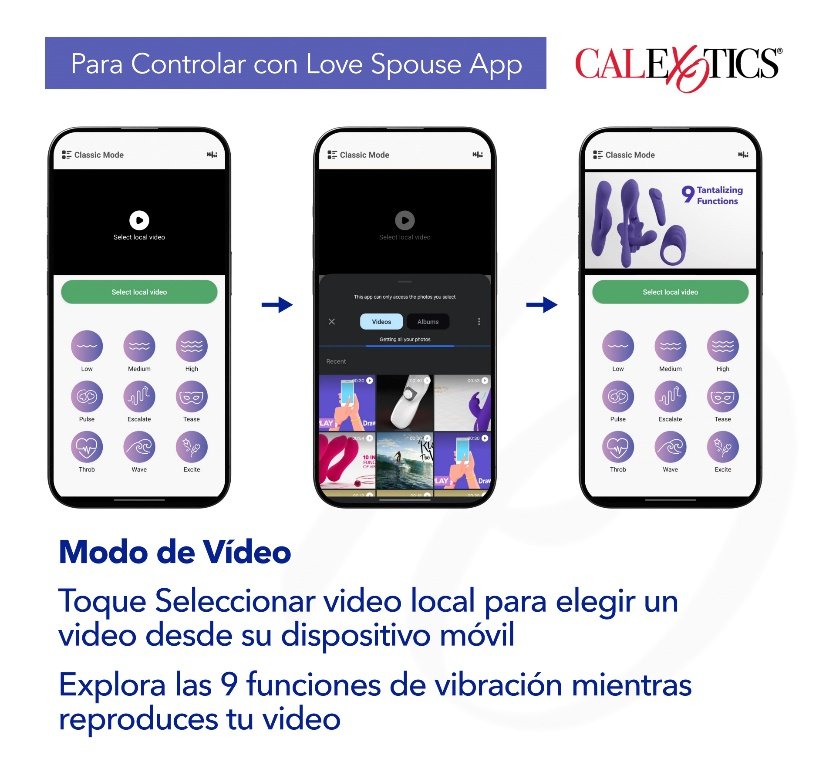
Video mode: Tap Video Mode to enter Video Mode. Tap Select Local Video to choose a video from your mobile device. Explore the 9 functions of vibration while your video plays.
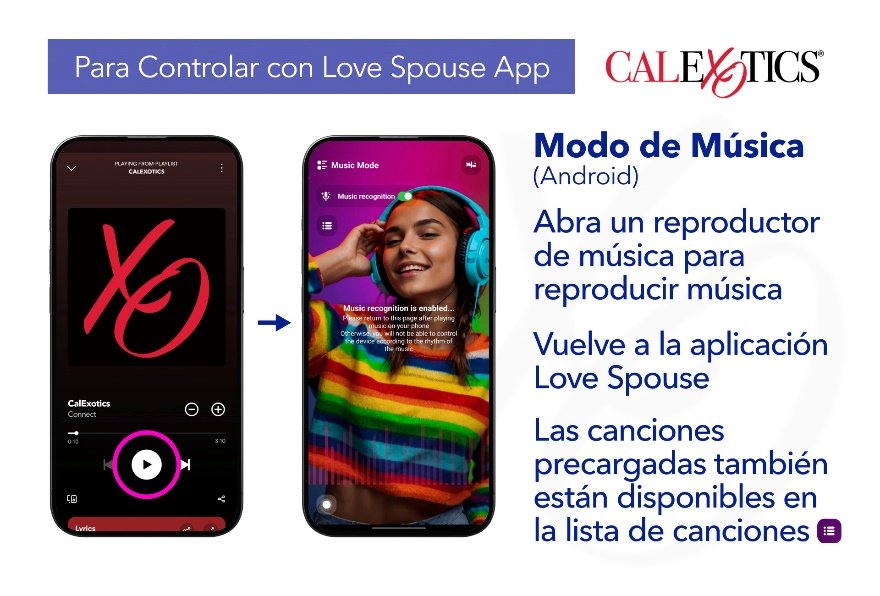
Music mode: Tap Music Mode to enter Music Mode.
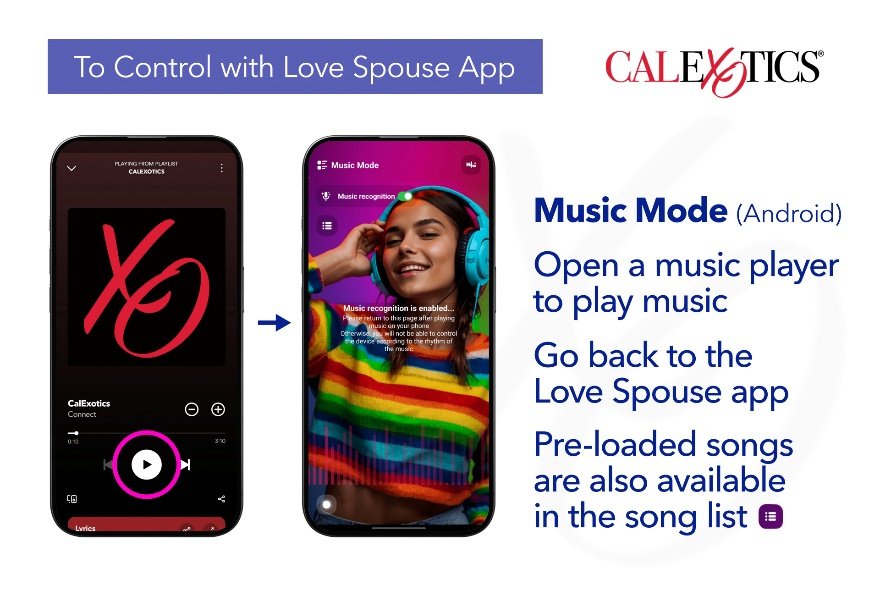
Android: Open a music player on your mobile device to start/stop the music (turn music recognition on to use this feature) The device will vibrate along with the music. Pre-loaded songs are also available in the song list.
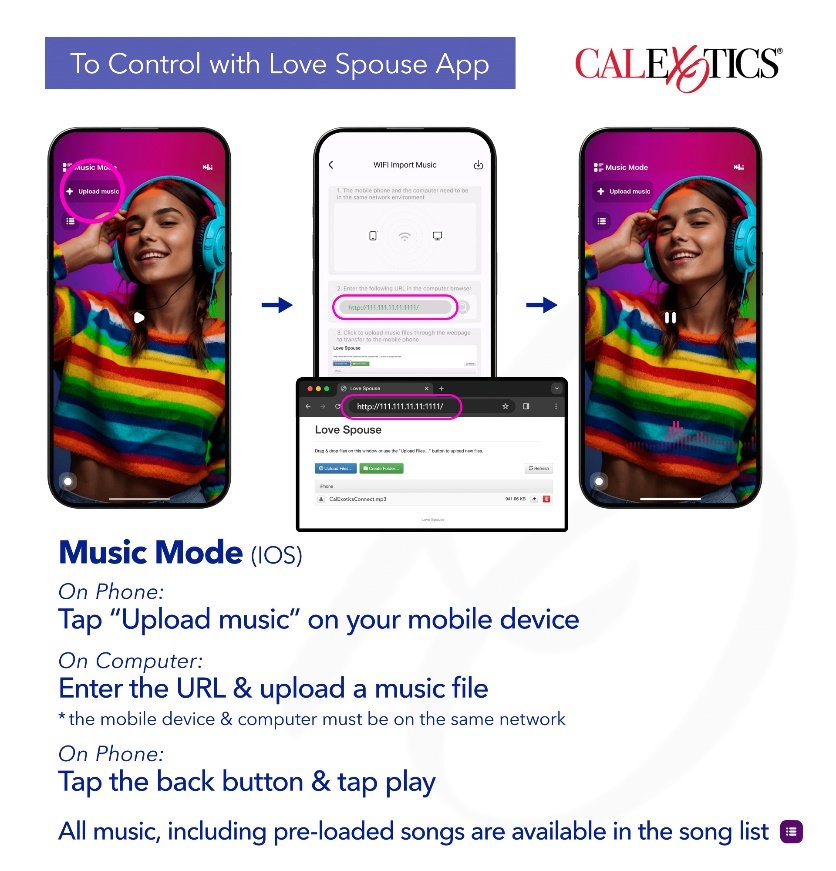
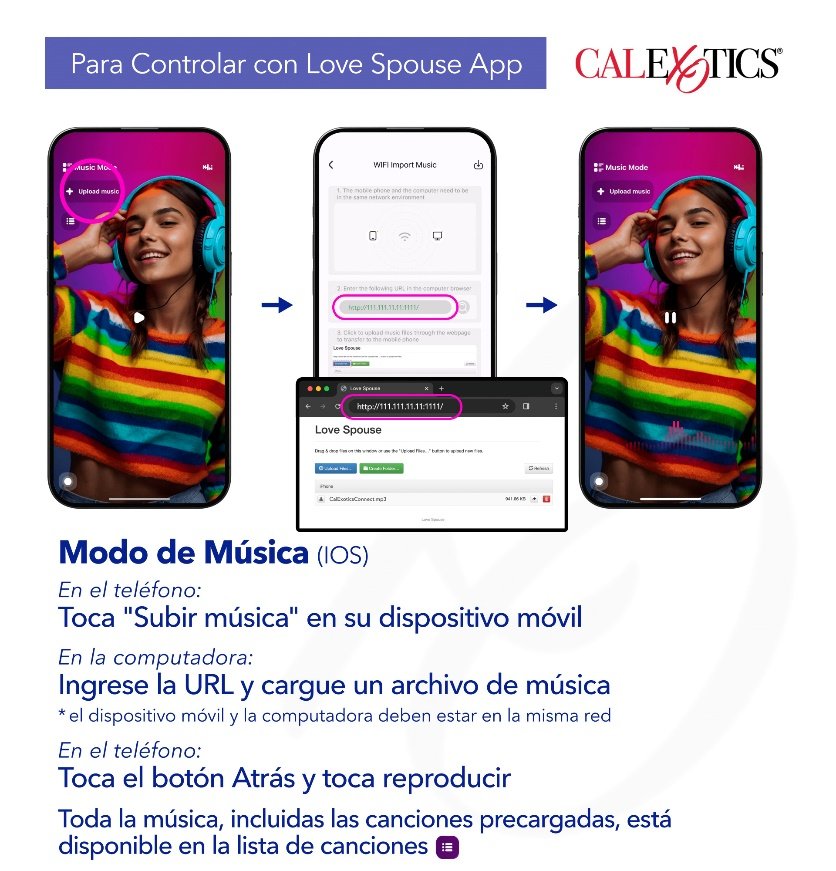
IOS: Tap Upload Music on your mobile device. Using your computer, enter the URL listed in the computer browser. Click Upload Files and select a music file. On your mobile device, tap the back button and then tap the play button to play the music. The device will vibrate along with the music. All music, including pre-loaded songs are available in the song list.
*The mobile device and computer must be on the same network
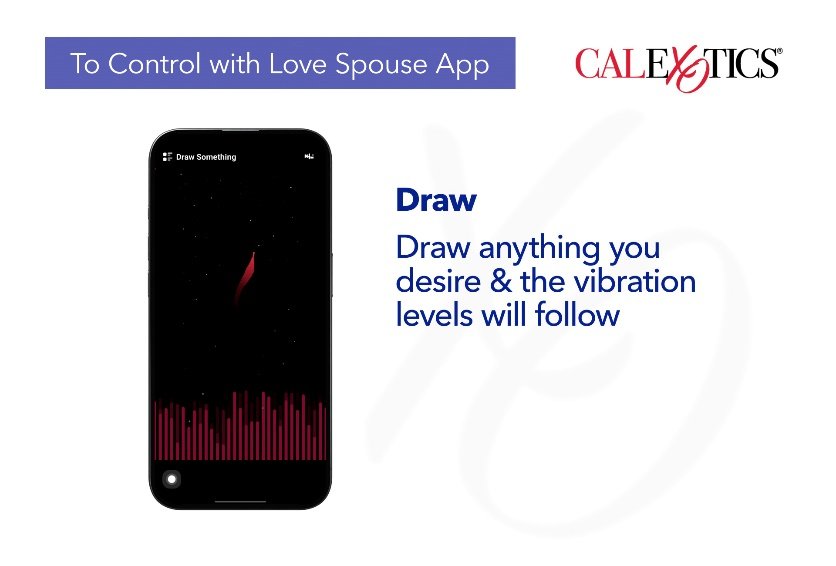
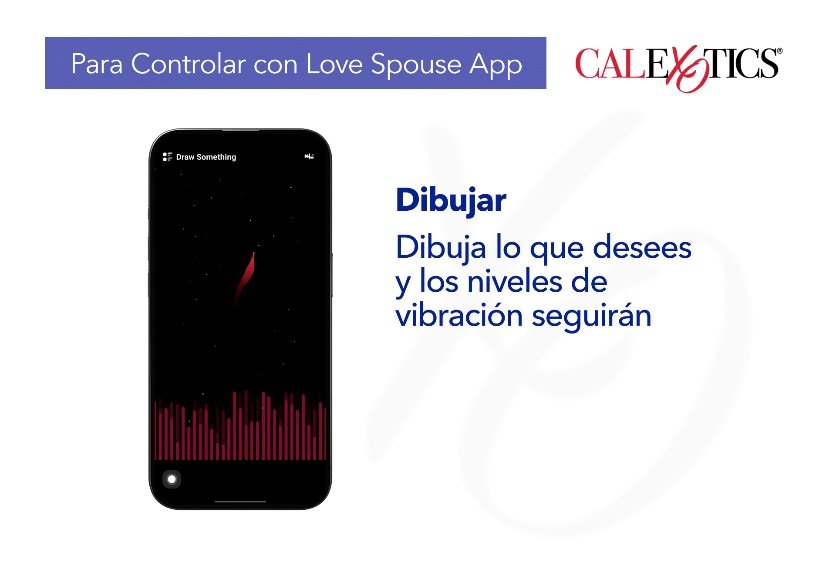
Draw something: Tap Draw Something to enter Draw Something. Draw anything you desire, and the vibration levels will follow according to the levels listed on the App.
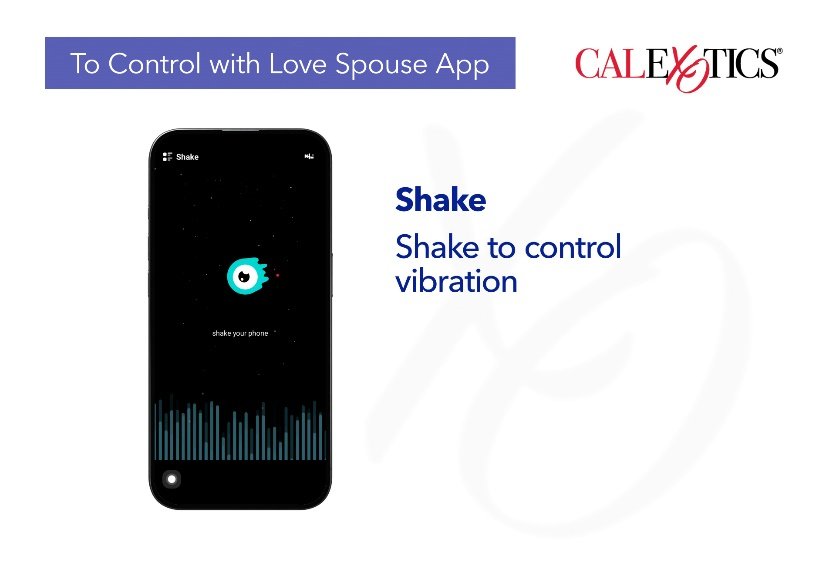
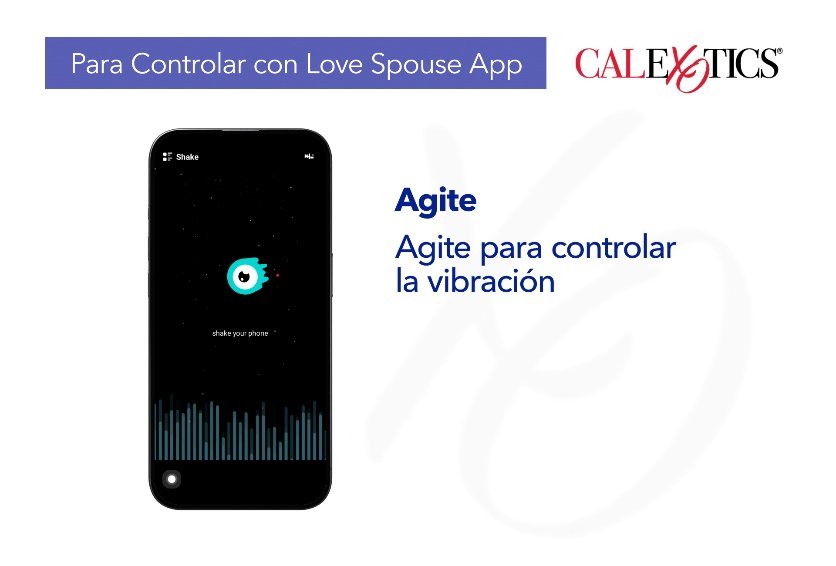
Shake: Tap Shake Mode to enter Shake Mode. Shake the mobile device, and the vibration frequency and rhythm will correspond with the shaking of the phone.
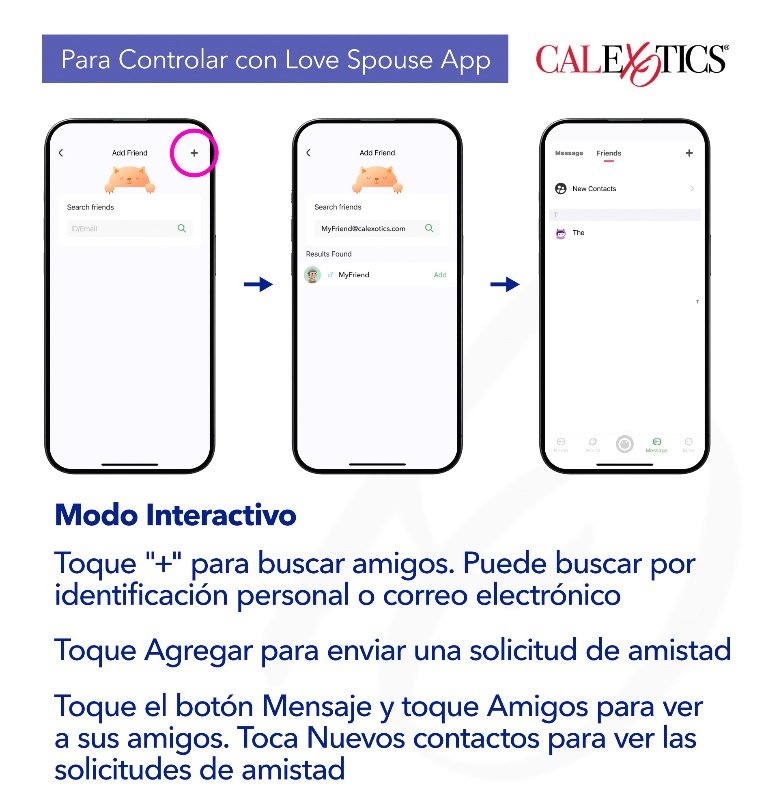
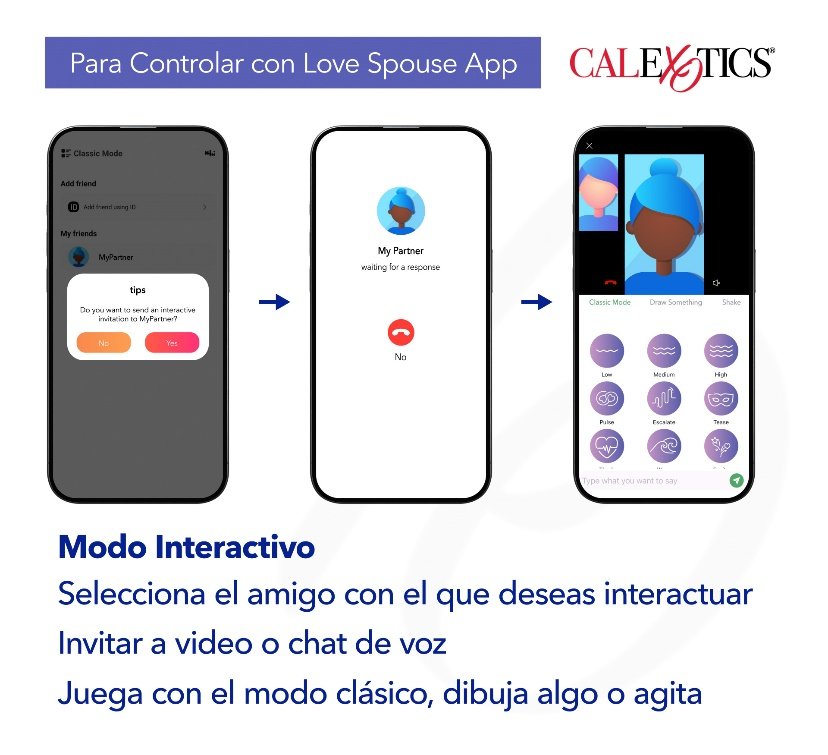
Interactive mode: Tap the Interactive Mode or slide the operation interface of the App to enter Interactive Mode.
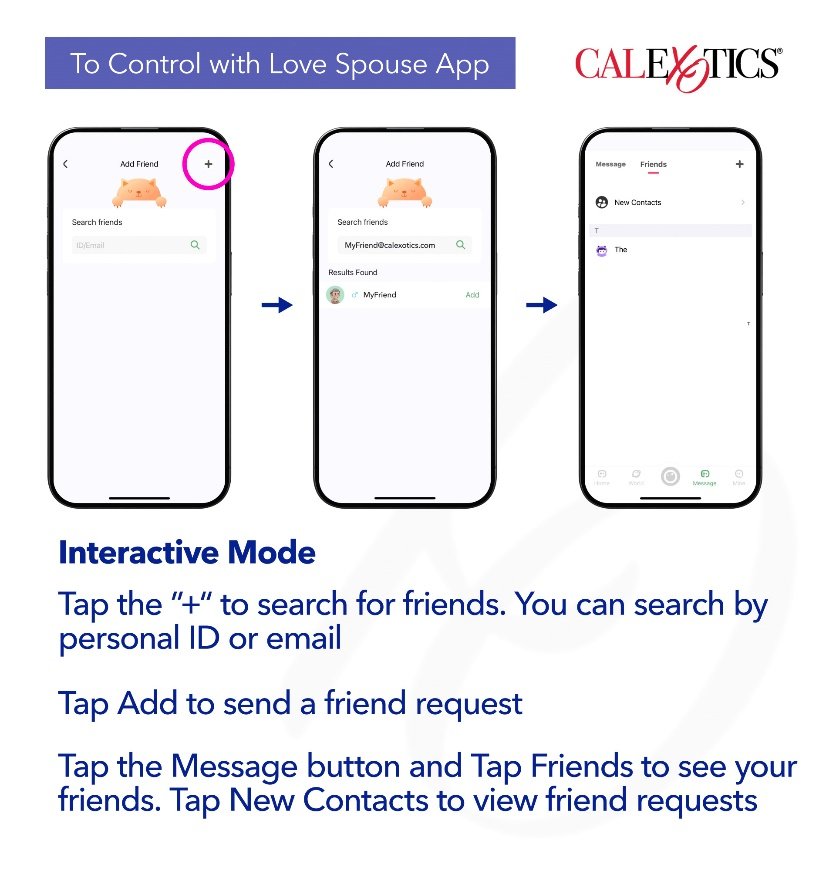
Add Friends: Tap the ”Add Friend Using ID“ to search for friends. You can search by personal ID or email. Once you enter the information, tap the magnifying glass icon to search. After the search results are displayed, tap Add to send a friend request.
Recipient of the friend request: Tap the Message button to enter the message center. Tap Friends, then New Contacts to view friend requests. Tap the user’s name to accept or decline the friend request.
Sender of the friend request: Tap the Message button to enter the message center. Tap Friends to see users who have accepted your friend request. Here you can send messages, delete, blacklist, or report friends.
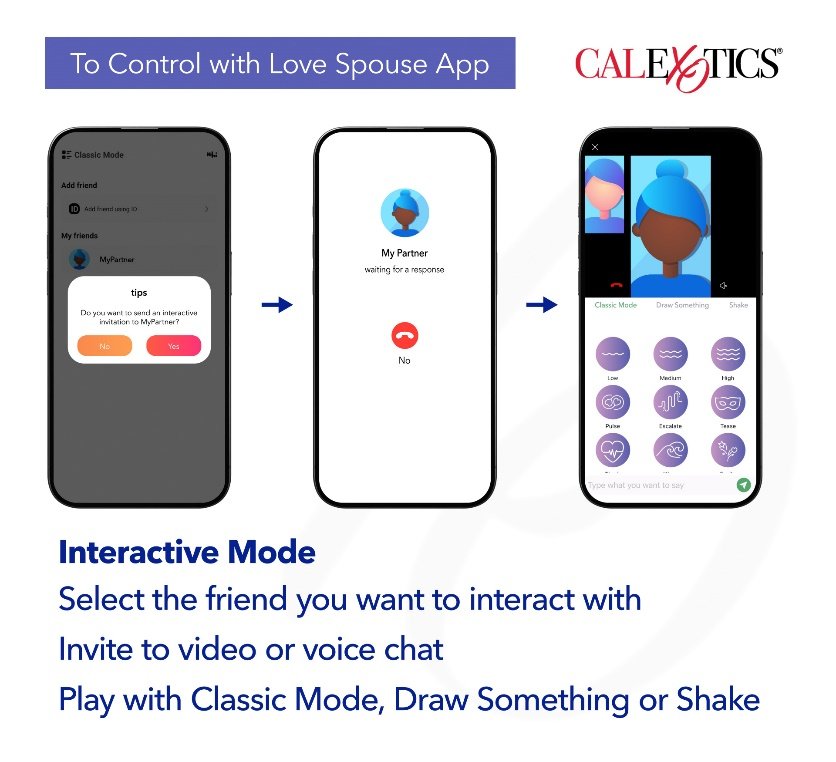
Go back to the homepage and Tap My Device. Tap the Interactive Mode to enter Interactive Mode. Select the friend you want to interact with. After the interactive connection is successful, you can send an invitation to video or voice chat. The other party must agree to open the video or voice function before the friends can interact. Once the interaction begins, friends can choose between Classic Mode, Draw Something or Shake.
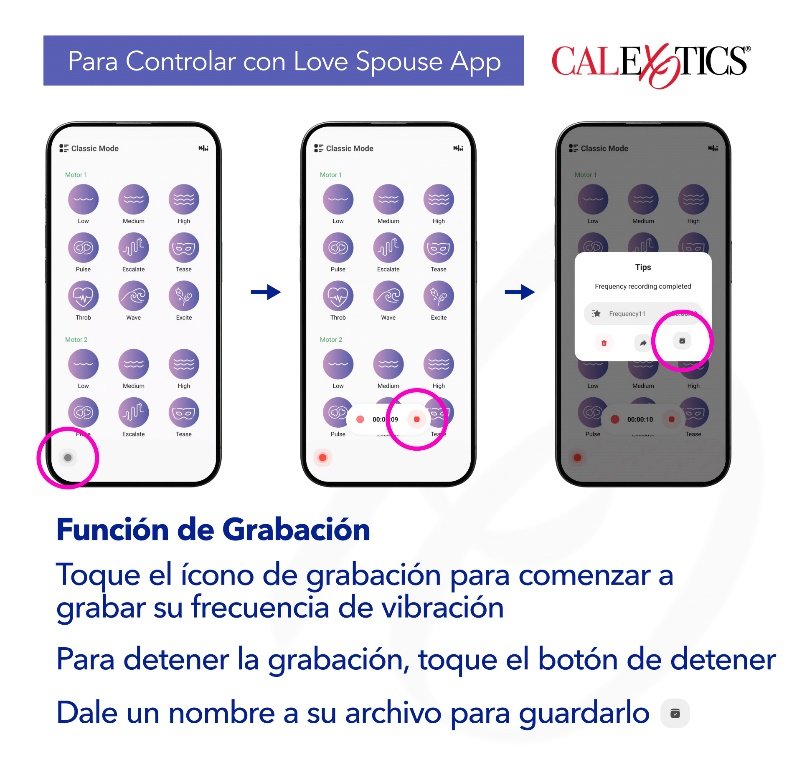
Record feature: Using the Love Spouse App, choose from Classic Mode, Music Mode, Draw Something or Shake. 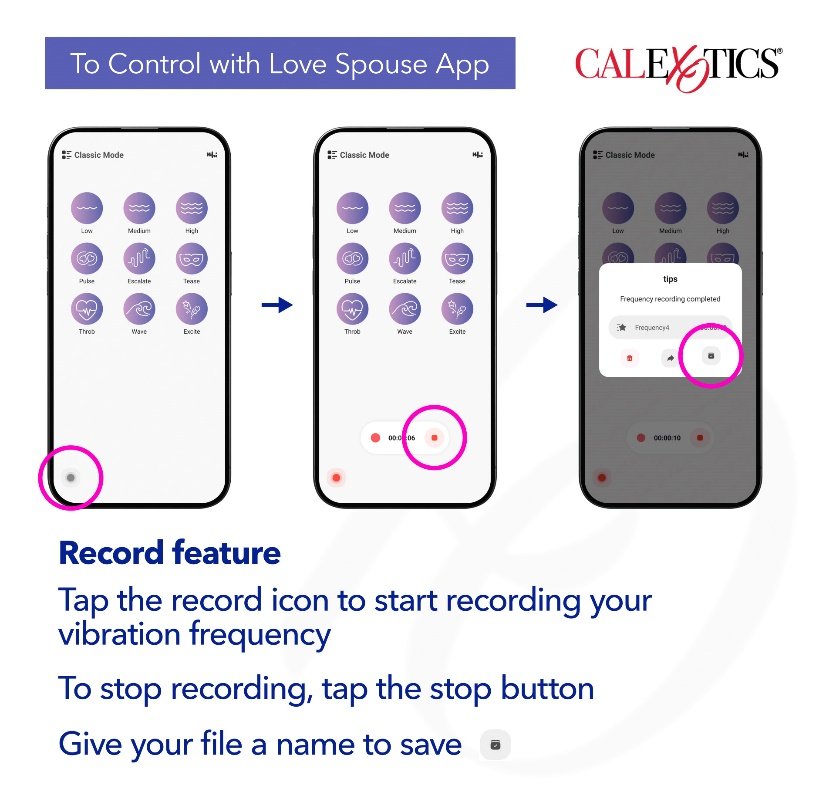
Tap the record icon in the lower left corner to start recording your vibration frequency. Explore the different vibration patterns. To stop recording your vibration frequency, tap the stop button. Discard your recorded vibration frequency by tapping the discard button. To save your recorded vibration frequency, give your file a name and tap save.
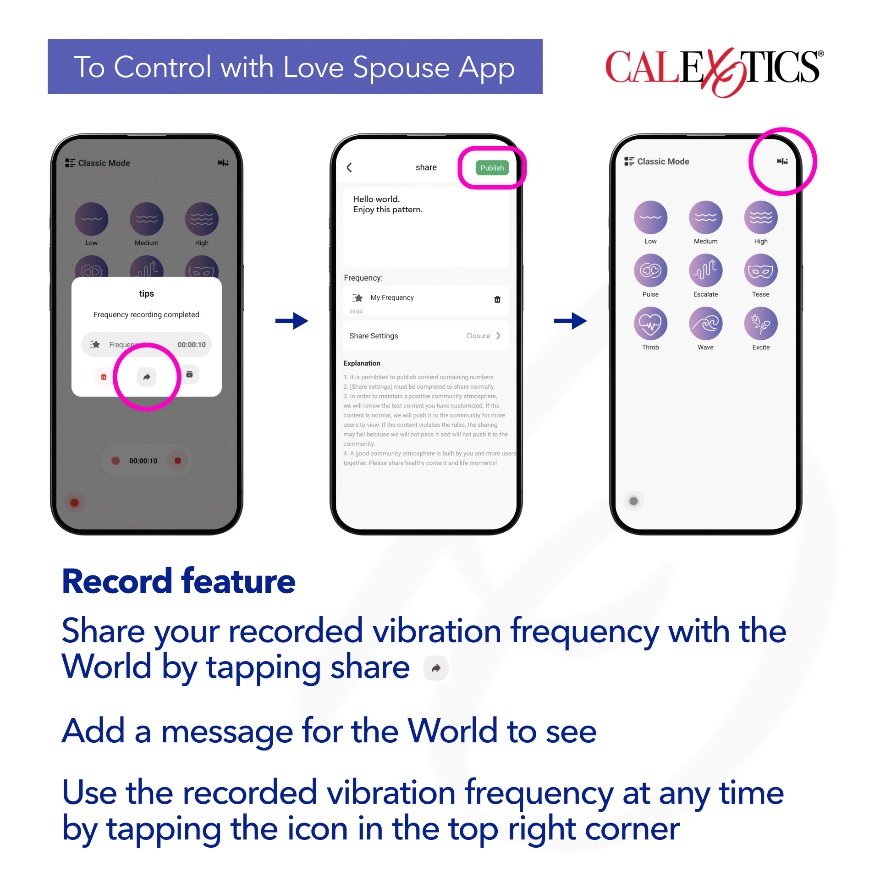
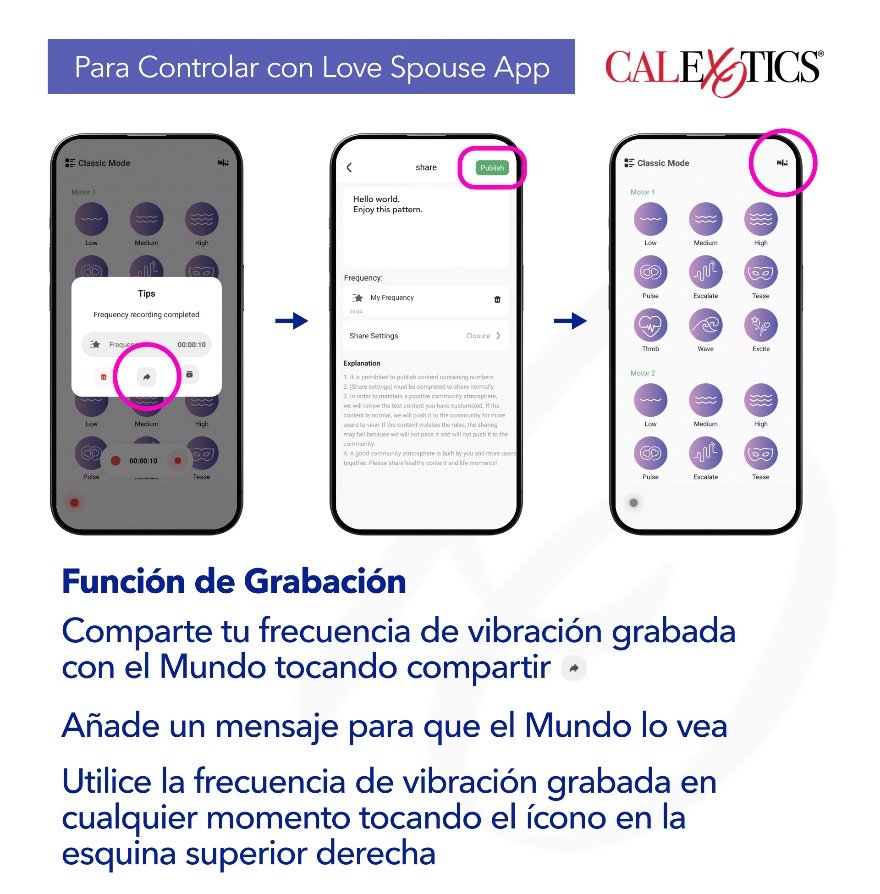
To share your recorded vibration frequency, give your file a name and tap share. Add a message for the World to see and tap Publish/Release. Use the recorded vibration frequency at any time by tapping the icon in the top right corner.
Coins:
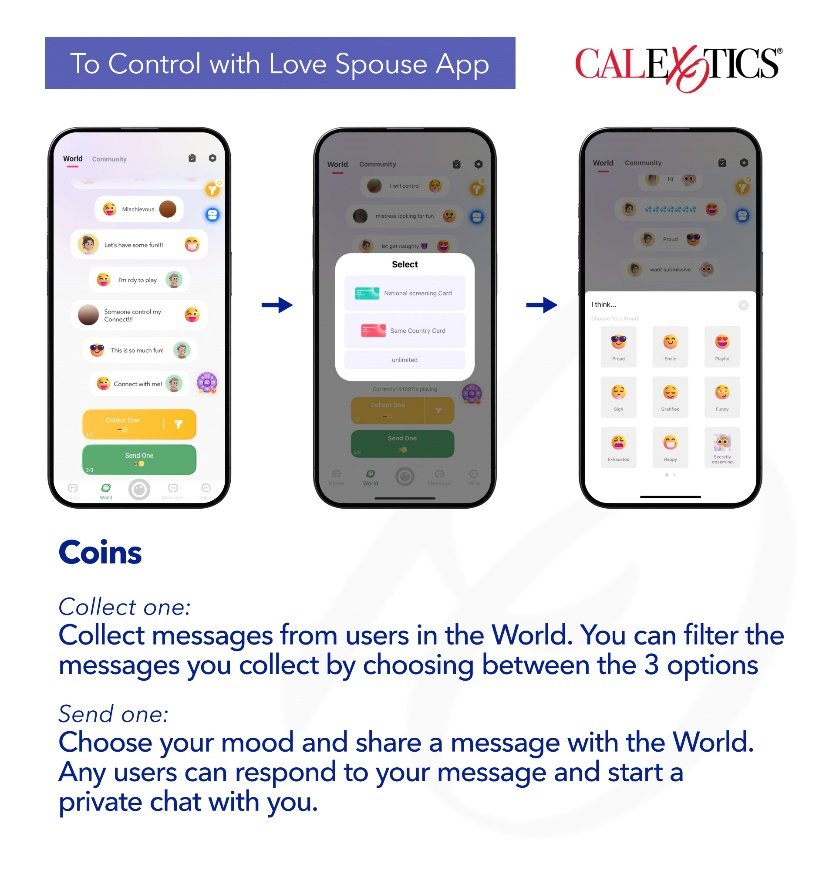
Using coins:
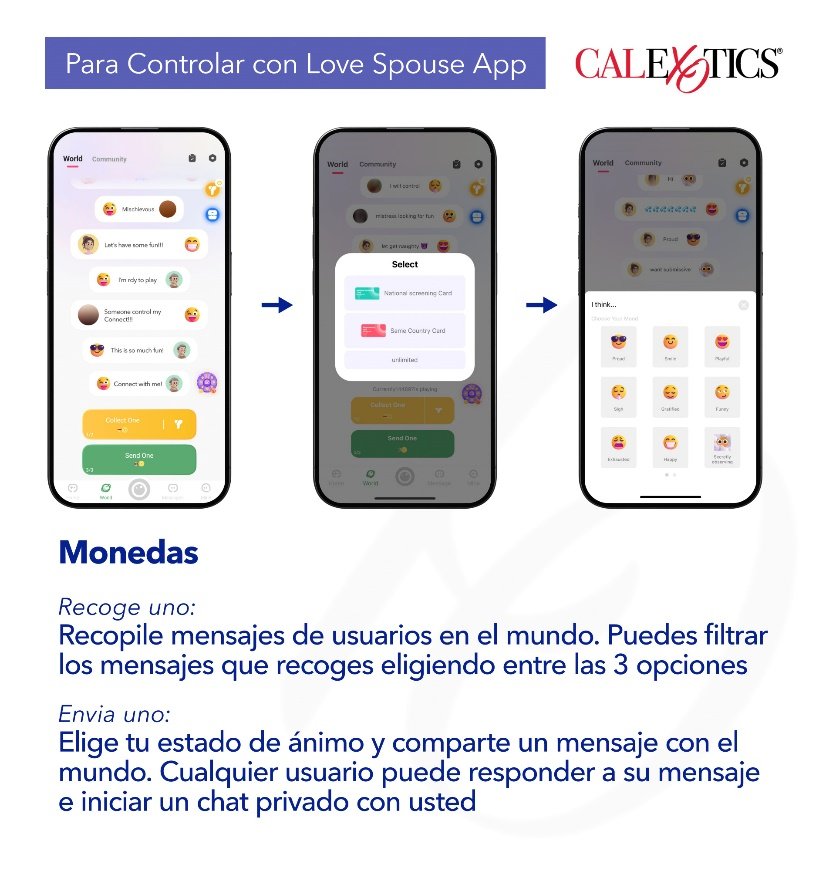
Collect one: Collect messages from users in the World. You can filter the messages you collect by choosing between:
National Screening Card/Country Filter Card: After selecting the country, users can only receive messages from users in the selected country.
Same Country Card: Users can only receive messages from users in their own country.
Unlimited: Users can receive messages from users in any country.
Send one: Choose your mood and share a message with the World. Any users can respond to your message and start a private chat with you.
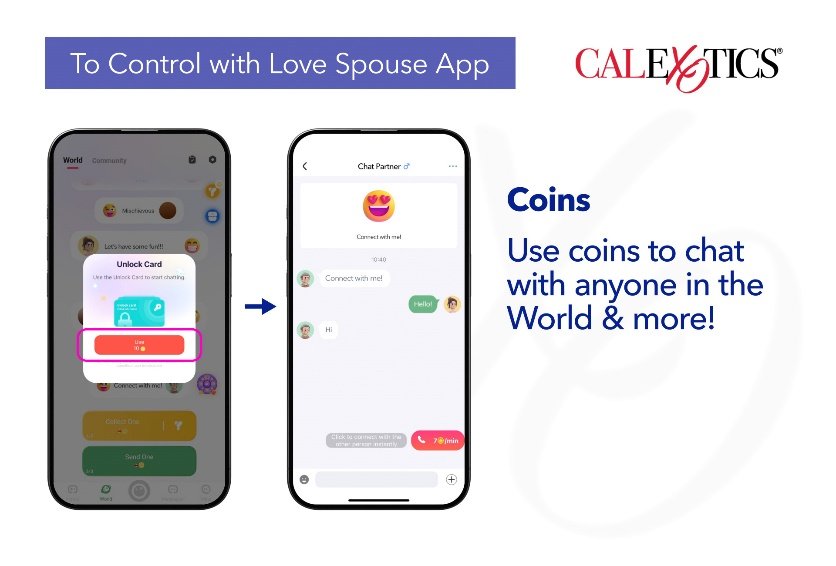
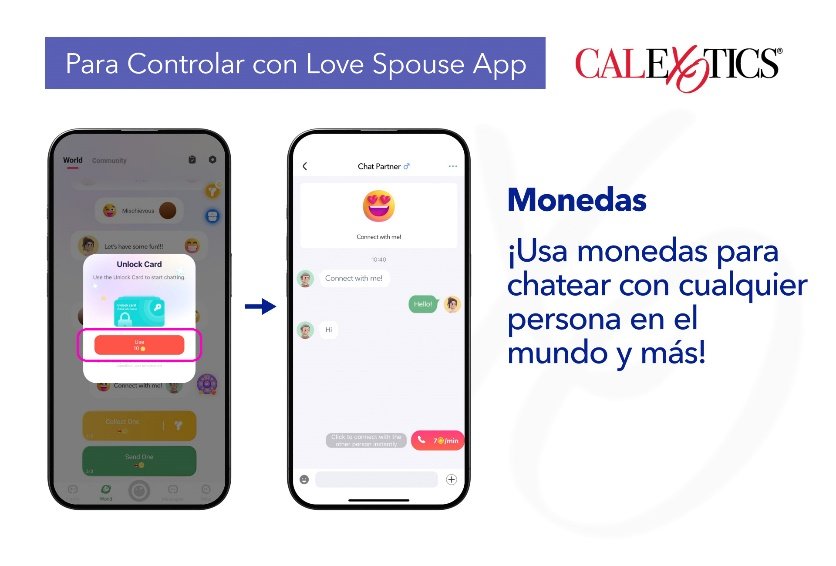
Private chat/Unlock Card: Use coins to unlock a chat with anyone in the World.
*Unlocking a chat with a coin grants unlimited access to the conversation, starting from the first message, with no time or message limits.
How to get coins:
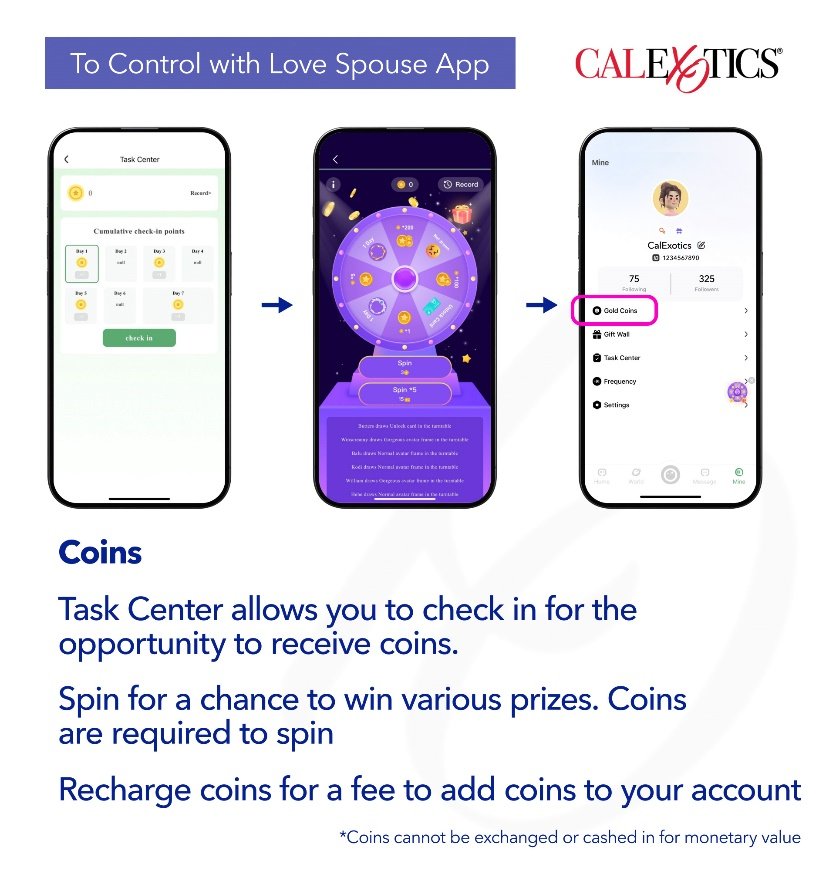
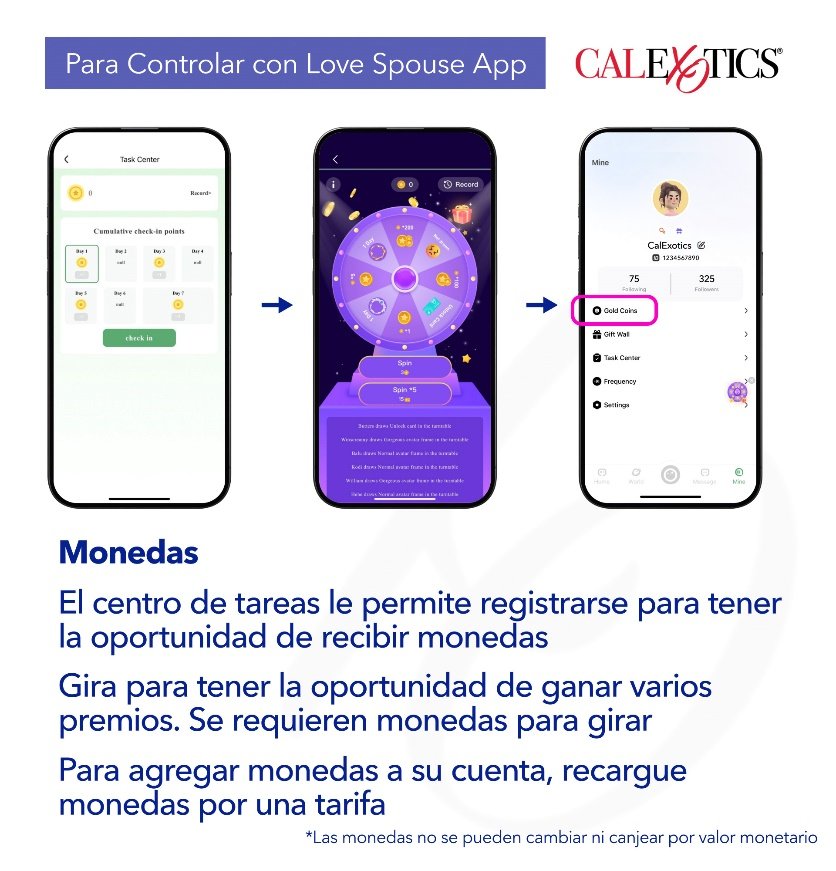
Task Center allows you to check in for the opportunity to receive coins.
Roulette Draw allows you to spin for a chance to win various prizes. Coins are required to spin.
Recharge coins for a fee to add coins to your account.
*Coins cannot be exchanged or cashed in for monetary value.
Controlling Your Device (product) Without the App:
Press and hold the power button for 3 seconds to activate; LED light will indicate the toy is activated.
Press the button to activate vibrations.
Press the button repeatedly until the desired function is reached.
To turn the product off, press and hold the power button for 3 seconds.
The Love Spouse app is constantly updated. Visit the Operation Guide on the Love Spouse app for the most up to date information.
 indica que este producto debe ser eliminado en un punto de recolección de desechos peligrosos local o en una instalación de reciclaje autorizada.
 y uno de los símbolos químicos CD (batería contiene cadmio), Hg (batería contiene mercurio) o Pb (batería contiene plomo). Las baterías de litio sólo pueden ser devueltas en un estado descargado a su punto de recogida local de desechos peligrosos o a un centro de reciclaje autorizado. Para protegerse contra cortocircuitos, descargue completamente el producto antes de desecharlo.